
Stream
字数: 0 字 时长: 0 分钟
1. 概述
Java 8 引入了 Stream API,它采用函数式编程的方式,可以对集合或数组进行链式处理。
传统方式通常需要手动编写循环,而 Stream 更关注:
对数据进行什么操作,而不是具体如何遍历数据。
例如:
authors.stream()
        .distinct()
        .filter(author -> author.getAge() < 18)
.forEach(author -> System.out.println(author.getName()));整个处理过程可以理解为:
数据源
  ↓
创建 Stream
  ↓
中间操作
  ↓
终结操作
  ↓
得到结果Stream 本身并不存储数据,数据仍然来自集合、数组等数据源。
2. 案例数据准备
后面的 Stream 示例统一使用 Author 和 Book 两个实体类。
2.1 Author
@Data
@NoArgsConstructor
@AllArgsConstructor
@EqualsAndHashCode // 用于后面的去重
public class Author {

    // id
    private Long id;

    // 姓名
    private String name;

    // 年龄
    private Integer age;

    // 简介
    private String intro;

    // 作品
    private List<Book> books;
}2.2 Book
@Data
@AllArgsConstructor
@NoArgsConstructor
@EqualsAndHashCode // 用于后面的去重
public class Book {

    // id
    private Long id;

    // 书名
    private String name;

    // 分类
    private String category;

    // 评分
    private Integer score;

    // 简介
    private String intro;
}2.3 初始化数据
private static List<Author> getAuthors() {

    // 作者
    Author author = new Author(
            1L, "蒙多", 33,
            "一个从菜刀中明悟哲理的祖安人", null
    );

    Author author2 = new Author(
            2L, "亚拉索", 15,
            "狂风也追逐不上他的思考速度", null
    );

    Author author3 = new Author(
            3L, "易", 14,
            "是这个世界在限制他的思维", null
    );

    Author author4 = new Author(
            3L, "易", 14,
            "是这个世界在限制他的思维", null
    );

    // 书籍列表
    List<Book> books1 = new ArrayList<>();
    List<Book> books2 = new ArrayList<>();
    List<Book> books3 = new ArrayList<>();

    books1.add(new Book(
            1L, "刀的两侧是光明与黑暗",
            "哲学,爱情", 88,
            "用一把刀划分了爱恨"
    ));

    books1.add(new Book(
            2L, "一个人不能死在同一把刀下",
            "个人成长,爱情", 99,
            "讲述如何从失败中明悟真理"
    ));

    books2.add(new Book(
            3L, "那风吹不到的地方",
            "哲学", 85,
            "带你用思维去领略世界的尽头"
    ));

    books2.add(new Book(
            3L, "那风吹不到的地方",
            "哲学", 85,
            "带你用思维去领略世界的尽头"
    ));

    books2.add(new Book(
            4L, "吹或不吹",
            "爱情,个人传记", 56,
            "一个哲学家的恋爱观注定很难把他所在的时代理解"
    ));

    books3.add(new Book(
            5L, "你的剑就是我的剑",
            "爱情", 56,
            "无法想象一个武者能对他的伴侣这么的宽容"
    ));

    books3.add(new Book(
            6L, "风与剑",
            "个人传记", 100,
            "两个哲学家灵魂和肉体的碰撞会激起怎么样的火花呢?"
    ));

    books3.add(new Book(
            6L, "风与剑",
            "个人传记", 100,
            "两个哲学家灵魂和肉体的碰撞会激起怎么样的火花呢?"
    ));

    author.setBooks(books1);
    author2.setBooks(books2);
    author3.setBooks(books3);
    author4.setBooks(books3);

    return new ArrayList<>(
            Arrays.asList(author, author2, author3, author4)
    );
}3. 快速入门
3.1 需求
调用 getAuthors() 获取作者集合,完成以下操作:
- 对作者进行去重
- 筛选年龄小于 18 岁的作者
- 打印作者姓名
3.2 匿名内部类写法
List<Author> authors = getAuthors();

authors.stream()
        .distinct()
        .filter(new Predicate<Author>() {
            @Override
            public boolean test(Author author) {
                return author.getAge() < 18;
            }
        })
        .forEach(new Consumer<Author>() {
            @Override
            public void accept(Author author) {
                System.out.println(author.getName());
            }
});使用 Lambda 表达式简化:
List<Author> authors = getAuthors();

authors.stream()
        .distinct()
        .filter(author -> author.getAge() < 18)
.forEach(author -> System.out.println(author.getName()));这段代码的执行过程:
authors
   ↓
stream()
创建 Stream
   ↓
distinct()
去重
   ↓
filter()
过滤年龄 < 18
   ↓
forEach()
打印姓名4. 创建 Stream
Stream 一般从集合、数组等数据源创建。
4.1 单列集合
单列集合可以直接调用 stream():
List<Author> authors = getAuthors();

Stream<Author> stream = authors.stream();例如:
authors.stream()
.forEach(author -> System.out.println(author));4.2 数组
数组可以使用 Arrays.stream() 创建 Stream:
Integer[] arr = {1, 2, 3, 4, 5};

Stream<Integer> stream = Arrays.stream(arr);也可以使用 Stream.of():
Integer[] arr = {1, 2, 3, 4, 5};

Stream<Integer> stream = Stream.of(arr);4.3 双列集合
Map 不能像 List 一样直接调用 stream()。
通常先通过 entrySet()、keySet() 或 values() 转换成单列集合,再创建 Stream。
例如使用 entrySet():
Map<String, Integer> map = new HashMap<>();

map.put("蜡笔小新", 19);
map.put("黑子", 17);
map.put("日向翔阳", 16);

Set<Map.Entry<String, Integer>> entrySet = map.entrySet();

Stream<Map.Entry<String, Integer>> stream = entrySet.stream();进行流式处理:
stream.filter(entry -> entry.getValue() > 16)
.forEach(entry -> System.out.println(entry));整体过程:
Map
 ↓
entrySet()
 ↓
Set<Map.Entry<K, V>>
 ↓
stream()
 ↓
Stream<Map.Entry<K, V>>5. Stream 操作分类
Stream 中的操作主要分为两类:
Stream
├── 中间操作
└── 终结操作5.1 中间操作
中间操作用于对数据进行处理,并返回一个新的 Stream。
例如:
filter()
map()
distinct()
sorted()
limit()
skip()
flatMap()中间操作可以继续进行链式调用:
authors.stream()
        .distinct()
        .filter(author -> author.getAge() < 18)
.map(author -> author.getName());中间操作本身通常不会立即执行。
具体内容单独整理在 Stream中间操作.md。
5.2 终结操作
终结操作用于真正触发 Stream 的执行,并得到最终结果。
例如:
forEach()
count()
max()
min()
collect()
findFirst()
reduce()例如:
authors.stream()
        .distinct()
        .filter(author -> author.getAge() < 18)
.forEach(author -> System.out.println(author.getName()));这里的 forEach() 就是终结操作。
终结操作会触发前面整个 Stream 操作链的执行。
具体内容单独整理在 Stream终止操作.md。
6. 注意事项
6.1 惰性求值
Stream 的中间操作具有惰性。
例如:
authors.stream()
.filter(author -> author.getAge() < 18);这里只有中间操作,没有终结操作,因此前面的处理不会真正得到最终结果。
加入终结操作:
authors.stream()
        .filter(author -> author.getAge() < 18)
.forEach(author -> System.out.println(author.getName()));此时才会真正执行整个 Stream 操作链。
没有终结操作,中间操作通常不会被真正执行。
6.2 Stream 是一次性的
一个 Stream 执行终结操作之后,就不能再次使用。
Stream<Author> stream = authors.stream();

stream.forEach(System.out::println);

// 这个 stream 已经被消费,不能再次使用如果还需要继续处理数据,需要重新创建 Stream:
authors.stream()
.forEach(System.out::println);6.3 Stream 不会直接修改原数据
Stream 中的操作通常是在数据处理过程中生成新的结果,并不会直接修改原集合。
例如:
List<Author> authors = getAuthors();

authors.stream()
        .filter(author -> author.getAge() < 18)
.forEach(author -> System.out.println(author.getName()));执行完成后,原来的 authors 集合仍然存在。
可以简单理解为:
原始数据
   ↓
Stream
   ↓
过滤 / 转换 / 排序
   ↓
得到处理结果Stream 主要用于处理数据,而不是直接修改数据源。
7. 小结
Stream 最基本的使用流程:
集合 / 数组
     ↓
创建 Stream
     ↓
中间操作
     ↓
终结操作
     ↓
得到结果例如:
authors.stream()
        .distinct()
        .filter(author -> author.getAge() < 18)
.forEach(author -> System.out.println(author.getName()));其中:
stream()    → 创建 Stream

distinct()  → 中间操作

filter()    → 中间操作

forEach() → 终结操作Stream 的核心就是:把对集合数据的处理过程组织成一条清晰的链式操作。
来源:原 Stream 笔记中的概述、案例数据、快速入门、创建流和注意事项。:contentReference[oaicite:0]{index=0} :contentReference[oaicite:1]{index=1} :contentReference[oaicite:2]
8. 基本数据类型流
8.1 为什么需要基本数据类型流
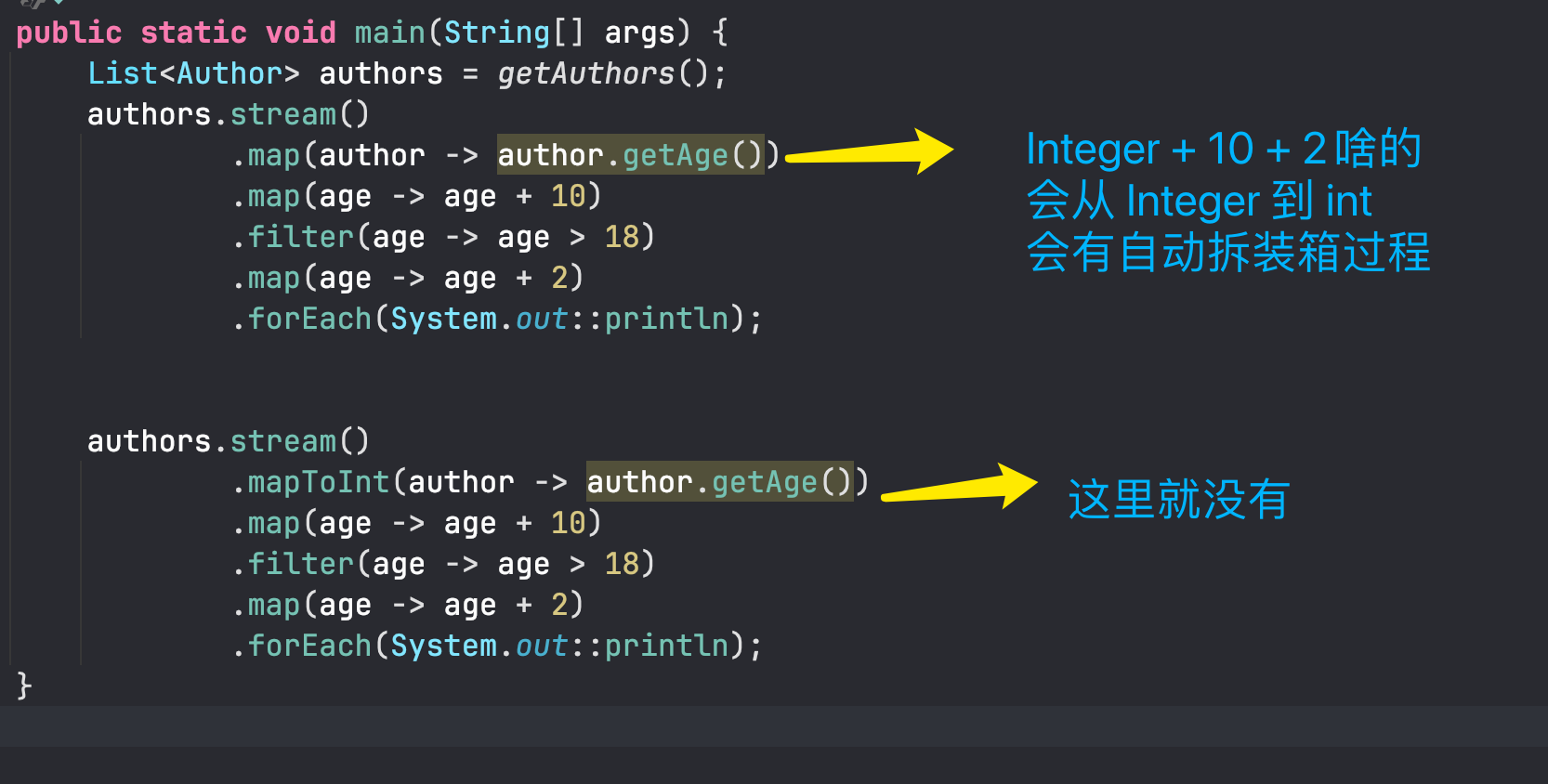
Stream 中很多 API 都使用泛型,因此操作数字时,实际处理的通常是包装类型。
例如:
Stream<Integer>
Stream<Long>
Stream<Double>虽然 Java 支持自动装箱和自动拆箱,但包装类型和基本数据类型之间频繁转换会产生额外开销。
例如:
int
 ↓ 装箱
Integer
 ↓ 拆箱
int数据量较小时这种开销通常可以忽略,但如果需要处理大量数字,并且频繁进行装箱、拆箱,就会产生一定的性能损耗。
因此 Stream 提供了专门针对基本数据类型的流:
IntStream
LongStream
DoubleStream基本数据类型流主要用于减少频繁装箱和拆箱带来的开销。
8.2 IntStream、LongStream、DoubleStream
Java 提供了三种常用的基本数据类型流:
| 类型 | 对应基本类型 |
|---|---|
IntStream | int |
LongStream | long |
DoubleStream | double |
例如普通 Stream:
Stream<Integer>其中保存的是 Integer。
而:
IntStream则直接处理 int 数据。
可以简单理解为:
Stream<Integer>
      ↓
包装类型 Integer

IntStream
      ↓
基本类型 int8.3 mapToInt()、mapToLong()、mapToDouble()
普通 Stream 可以通过以下方法转换成基本数据类型流:
mapToInt()
mapToLong()
mapToDouble()例如,将作者对象转换成作者年龄:
List<Author> authors = getAuthors();

IntStream ageStream = authors.stream()
.mapToInt(author -> author.getAge());执行过程:
Stream<Author>
      ↓
mapToInt()
      ↓
IntStream如果使用普通 map():
authors.stream()
.map(author -> author.getAge());得到的是:
Stream<Integer>而使用:
authors.stream()
.mapToInt(author -> author.getAge());得到的是:
IntStream同理:
mapToLong()用于转换成:
LongStreammapToDouble()用于转换成:
DoubleStream8.4 flatMapToInt()、flatMapToLong()、flatMapToDouble()
除了普通的 flatMap(),Stream 还提供了针对基本数据类型的展开方法:
flatMapToInt()
flatMapToLong()
flatMapToDouble()它们的作用和 flatMap() 类似,只不过最终得到的是对应的基本数据类型流。
flatMapToInt()
      ↓
IntStream

flatMapToLong()
      ↓
LongStream

flatMapToDouble()
      ↓
DoubleStream实际开发中最常见的还是:
mapToInt()
mapToLong()
mapToDouble()8.5 小结
普通 Stream:
Stream<Integer>
Stream<Long>
Stream<Double>处理的是包装类型。
基本数据类型流:
IntStream
LongStream
DoubleStream直接处理基本数据类型,可以减少频繁装箱和拆箱产生的额外开销。
常见转换方法:
mapToInt()       → IntStream

mapToLong()      → LongStream

mapToDouble() → DoubleStream大量处理数值数据时,可以考虑使用
IntStream、LongStream、DoubleStream,避免不必要的装箱和拆箱。