
IO基础
字数: 0 字 时长: 0 分钟
上来先来一张图
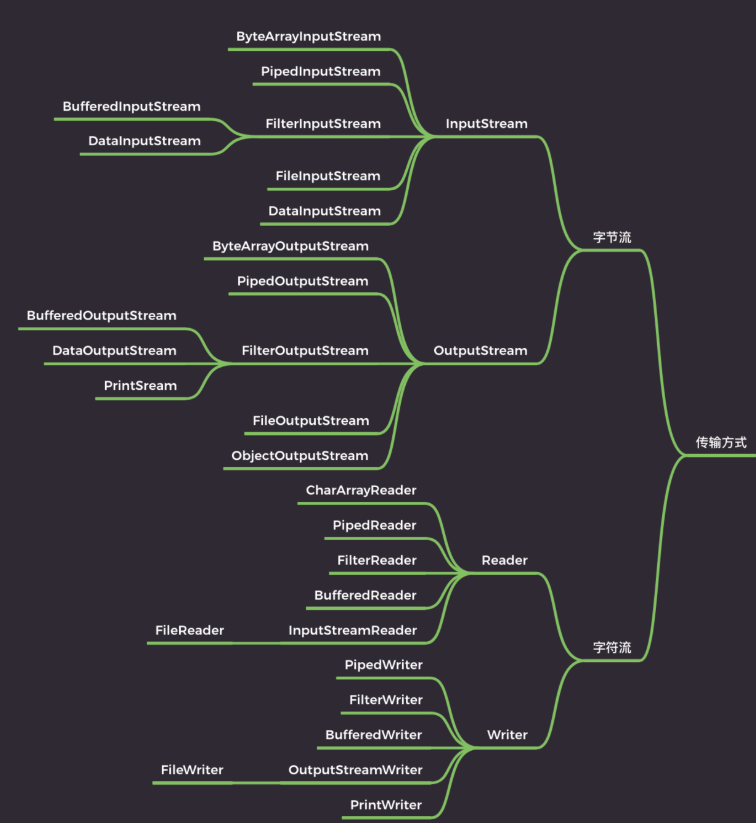
初学习 Java IO 的时候头也大,乌央乌央的一片,全是类,估计是所有 Java 包里面类最多的,一会是 Input 一会是 Output,一会是 Reader 一会是 Writer,真不知道 Java 的设计者是怎么想的
1. 初识 Java IO
IO,即in和out,也就是输入和输出,指应用程序和外部设备之间的数据传递,常见的外部设备包括文件、管道、网络连接。
Java 中是通过流处理IO 的,那么什么是流?
流(Stream),是一个抽象的概念,是指一连串的数据(字符或字节),是以先进先出的方式发送信息的通道。
当程序需要读取数据的时候,就会开启一个通向数据源的流,这个数据源可以是文件,内存,或是网络连接。类似的,当程序需要写入数据的时候,就会开启一个通向目的地的流。这时候你就可以想象数据好像在这其中“流”动一样。
一般来说关于流的特性有下面几点:
先进先出:最先写入输出流的数据最先被输入流读取到。
顺序存取:可以一个接一个地往流中写入一串字节,读出时也将按写入顺序读取一串字节,不能随机访问中间的数据。(RandomAccessFile除外)
只读或只写:每个流只能是输入流或输出流的一种,不能同时具备两个功能,输入流只能进行读操作,对输出流只能进行写操作。在一个数据传输通道中,如果既要写入数据,又要读取数据,则要分别提供两个流。
2. 传输方式划分
Java IO 按照数据的传输单位,可以分为两类:
Java IO
├── 字节流
└── 字符流在理解字节流和字符流之前,先搞清楚两个概念:字节(byte)和字符(char)。
2.1 字节与字符
**字节(byte)**是计算机中表示存储容量的基本单位:
1 byte = 8 bit**字符(character)**表示一个具体的文字或符号,例如:
A
1
$
中字符最终要存储到计算机中,需要经过字符编码转换成字节。
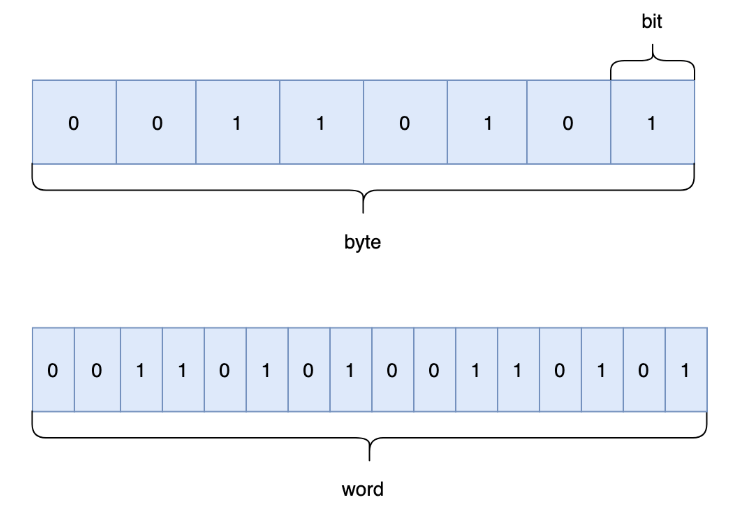
不同字符编码下,同一个字符占用的字节数可能不同。
例如 UTF-8:
英文字符 A
    ↓
1 个字节

中文字符 中
    ↓
通常为 3 个字节而 Java 中的 char 是一个 16 位的 UTF-16 代码单元,占用 2 个字节。
所以不要简单理解成:
一个字符 = 一个字节
一个汉字 = 两个字节更准确的关系应该是:
字符
    ↓
字符编码
    ↓
字节日常开发中最常见的字符编码之一就是:
UTF-82.2 字节流和字符流
理解了字节和字符以后,字节流和字符流就比较容易理解了。
字节流以字节为单位读写数据,可以处理几乎所有类型的文件,例如:
图片
MP3
视频
PDF
Word
压缩包
文本文件常见的字节流:
InputStream
OutputStream字符流以字符为单位处理数据,主要用于:
文本文件常见的字符流:
Reader
Writer可以简单理解为:
字节流
    ↓
面向 byte
    ↓
可以处理各种类型的数据


字符流
    ↓
面向 char
    ↓
主要处理文本数据所以在 Java IO 中,最核心的就是四个抽象类:
                Java IO

        字节流              字符流
          │                  │
    ┌─────┴─────┐      ┌─────┴─────┐
    │           │      │           │
InputStream OutputStream Reader    Writer
    │           │      │           │
读 写 读 写虽然 Java IO 中的类非常多,但绝大多数 IO 操作最终都围绕两个动作展开:
read
write2.3 InputStream
InputStream 是所有字节输入流的抽象父类。
常用方法:
| 方法 | 作用 |
|---|---|
int read() | 读取一个字节 |
int read(byte[] b) | 读取多个字节到数组 |
int read(byte[] b, int off, int len) | 从数组 off 位置开始存放,最多读取 len 个字节 |
long skip(long n) | 跳过指定数量的字节 |
int available() | 返回当前可无阻塞读取的估计字节数 |
void close() | 关闭流并释放资源 |
例如:
InputStream inputStream =
        new FileInputStream("test.txt");

int data = inputStream.read();

inputStream.close();2.4 OutputStream
OutputStream 是所有字节输出流的抽象父类。
常用方法:
| 方法 | 作用 |
|---|---|
void write(int b) | 写入一个字节 |
void write(byte[] b) | 写入一个字节数组 |
void write(byte[] b, int off, int len) | 写入数组中从 off 开始的 len 个字节 |
void flush() | 刷新输出流 |
void close() | 关闭流并释放资源 |
需要注意:
write(int b)虽然参数类型是:
int但真正写入的只有:
低 8 位高 24 位会被忽略。
2.5 Reader
Reader 是所有字符输入流的抽象父类。
常用方法:
| 方法 | 作用 |
|---|---|
int read() | 读取一个字符 |
int read(char[] cbuf) | 读取多个字符到字符数组 |
int read(char[] cbuf, int off, int len) | 从数组 off 位置开始存放,最多读取 len 个字符 |
long skip(long n) | 跳过指定数量的字符 |
boolean ready() | 判断流是否已经准备好被读取 |
void close() | 关闭流并释放资源 |
2.6 Writer
Writer 是所有字符输出流的抽象父类。
常用方法:
| 方法 | 作用 |
|---|---|
void write(int c) | 写入一个字符 |
void write(char[] cbuf) | 写入字符数组 |
void write(char[] cbuf, int off, int len) | 写入数组中从 off 开始的 len 个字符 |
void write(String str) | 写入字符串 |
void flush() | 刷新输出流 |
void close() | 关闭流并释放资源 |
2.7 字节流和字符流的区别
两者最核心的区别是:
| 对比 | 字节流 | 字符流 |
|---|---|---|
| 基本单位 | byte | char |
| 输入抽象类 | InputStream | Reader |
| 输出抽象类 | OutputStream | Writer |
| 主要处理 | 二进制数据 | 文本数据 |
| 是否涉及字符编码 | 一般不直接处理 | 需要考虑字符编码 |
| 图片、音频、视频 | ✅ | ❌ |
| 文本文件 | ✅ | ✅ |
因此:
图片 / 音频 / 视频 / 压缩包
        ↓
      字节流

文本文件
        ↓
字符流当然,文本文件本质上仍然是字节数据,所以字节流同样可以读取文本文件,只不过需要自己处理:
字节
    ↓
字符编码
    ↓
字符字符流则帮助我们完成了这层字符处理。
2.8 关于缓冲区
字节流和字符流都不能简单理解成:
字节流没有缓冲
字符流自带缓冲Java IO 中专门提供了缓冲流:
BufferedInputStream
BufferedOutputStream

BufferedReader
BufferedWriter它们通过缓冲区减少底层 IO 操作次数,从而提高读写效率。
一些字符转换类内部也可能存在临时缓冲区。
例如 OutputStreamWriter 的部分实现中,会使用字符数组辅助进行字符转换:
private char[] writeBuffer;

private static final int WRITE_BUFFER_SIZE = 1024;

public void write(
        String str,
        int off,
        int len
) throws IOException {

    synchronized (lock) {

        char[] cbuf;

        if (
                len <= WRITE_BUFFER_SIZE
        ) {

            if (
                    writeBuffer == null
            ) {
                writeBuffer =
                        new char[WRITE_BUFFER_SIZE];
            }

            cbuf =
                    writeBuffer;

        } else {

            cbuf =
                    new char[len];
        }

        str.getChars(
                off,
                off + len,
                cbuf,
                0
        );

        write(
                cbuf,
                0,
                len
        );
    }
}这里的 writeBuffer 主要用于辅助字符转换和写入,不能直接等同于 BufferedWriter 这种专门的缓冲流。
2.9 字节流和字符流代码对比
以文件复制为例,两种流的代码其实非常相似。
使用字节流:
try (
        FileInputStream fis =
                new FileInputStream("input.txt");

        FileOutputStream fos =
                new FileOutputStream("output.txt")
) {

    byte[] buffer =
            new byte[1024];

    int len;

    while (
            (len = fis.read(buffer)) != -1
    ) {

        fos.write(
                buffer,
                0,
                len
        );
    }

} catch (
        IOException e
) {

    e.printStackTrace();
}整个过程:
input.txt
    ↓
FileInputStream
    ↓
byte[]
    ↓
FileOutputStream
    ↓
output.txt使用的是:
byte[]使用字符流:
try (
        FileReader reader =
                new FileReader("input.txt");

        FileWriter writer =
                new FileWriter("output.txt")
) {

    char[] buffer =
            new char[1024];

    int len;

    while (
            (len = reader.read(buffer)) != -1
    ) {

        writer.write(
                buffer,
                0,
                len
        );
    }

} catch (
        IOException e
) {

    e.printStackTrace();
}整个过程:
input.txt
    ↓
FileReader
    ↓
char[]
    ↓
FileWriter
    ↓
output.txt使用的是:
char[]两者代码结构基本一致,真正的区别在于:
字节流
    ↓
byte / byte[]


字符流
    ↓
char / char[]所以记住 Java IO 最核心的四个抽象类即可:
InputStream
OutputStream

Reader
Writer再往后的各种 IO 类,基本都是围绕这四个体系进行扩展。
3. 操作对象划分
IO,也就是输入和输出(Input / Output):
- Input:将外部数据读入内存,比如把文件从硬盘读取到内存、从网络读取数据到内存等。
- Output:将内存中的数据写到外部,比如把数据从内存写入文件、输出到网络等。
程序运行时的数据主要在内存中处理,如果需要持久化,就需要把数据输出到外部,例如写入文件。
文件操作是 IO 中最典型、最常见的操作。如果按照 IO 的操作对象 来划分,可以分为:文件、数组(内存)、管道、基本数据类型、缓冲、打印、对象序列化 / 反序列化,以及转换等。
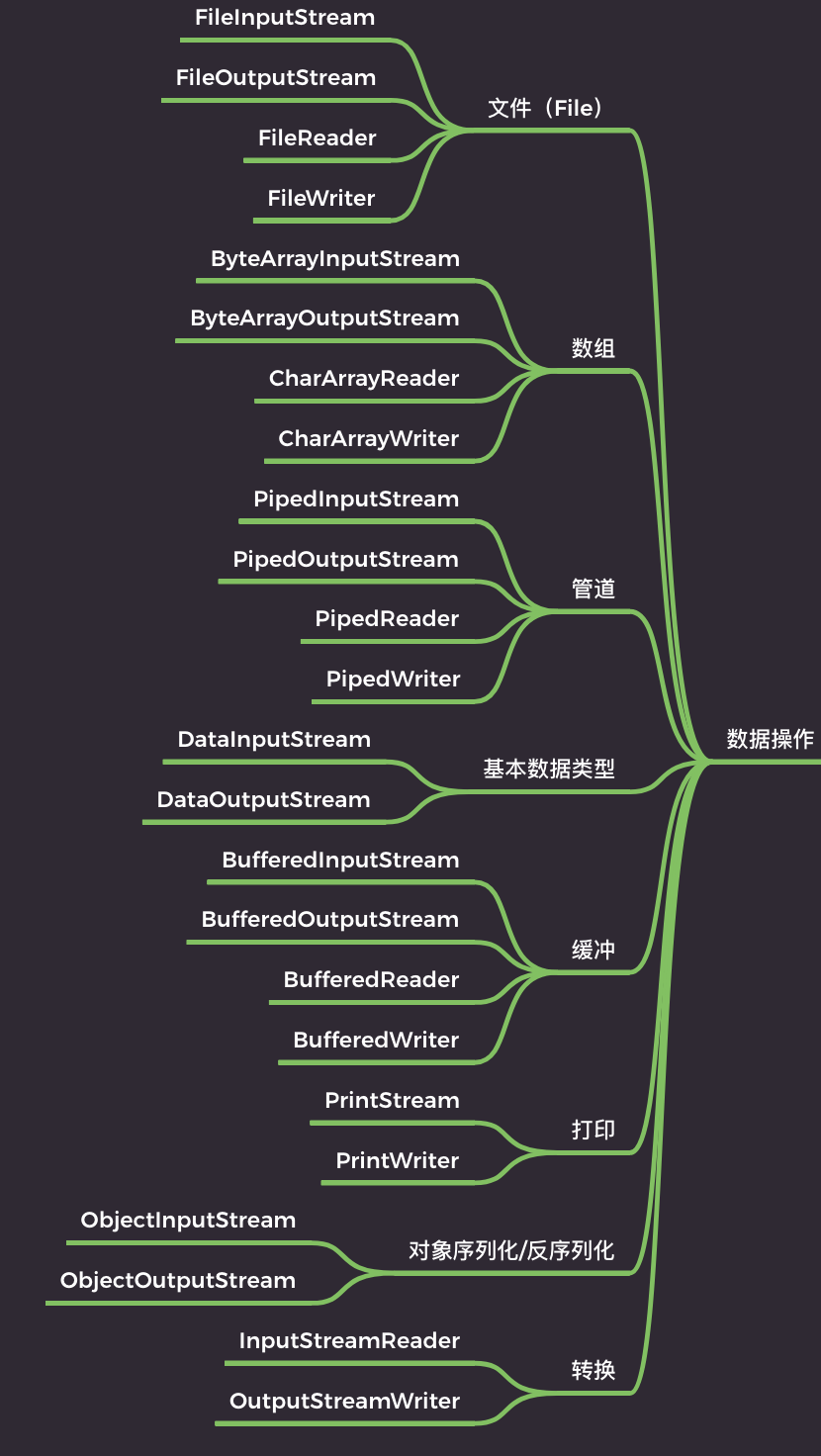
3.1 文件
文件流就是直接对文件内容进行读写的流,可以分为字节流(FileInputStream、FileOutputStream)和字符流(FileReader、FileWriter)。
FileInputStream 示例:
public class FileInputStreamDemo {
    public static void main(String[] args) throws IOException {
        // 声明一个 int 类型的变量 b,用于存储读取到的字节
        int b;

        // 创建一个 FileInputStream 对象,用于读取文件 fis.txt 中的数据
        FileInputStream fis1 = new FileInputStream("fis.txt");

        // 循环读取文件中的数据
        while ((b = fis1.read()) != -1) {
            // 将读取到的字节转换为对应的 ASCII 字符,并输出到控制台
            System.out.println((char) b);
        }

        // 关闭 FileInputStream 对象,释放资源
        fis1.close();
    }
}FileOutputStream 示例:
public class FileOutputStreamDemo {
    public static void main(String[] args) throws IOException {
        // 创建一个 FileOutputStream 对象,用于写入数据到文件 fos.txt 中
        FileOutputStream fos = new FileOutputStream("fos.txt");

        // 向文件中写入数据,这里写入的是字符串 "kerwim" 对应的字节数组
        fos.write("kerwim".getBytes());

        // 关闭 FileOutputStream 对象,释放资源
        fos.close();
    }
}FileReader 示例:
public class FileReaderDemo {
    public static void main(String[] args) throws IOException {
        // 声明一个 int 类型的变量 b,用于存储读取到的字符
        int b = 0;

        // 创建一个 FileReader 对象,用于读取文件 read.txt 中的数据
        FileReader fileReader = new FileReader("read.txt");

        // 循环读取文件中的数据
        while ((b = fileReader.read()) != -1) {
            // 将读取到的字符强制转换为 char 类型,并输出到控制台
            System.out.println((char) b);
        }

        // 关闭 FileReader 对象,释放资源
        fileReader.close();
    }
}FileWriter 示例:
public class FileWriterDemo {
    public static void main(String[] args) throws IOException {
        // 创建一个 FileWriter 对象,用于写入数据到文件 fw.txt 中
        FileWriter fileWriter = new FileWriter("fw.txt");

        // 将字符串 "kerwim" 转换为字符数组
        char[] chars = "kerwim".toCharArray();

        // 向文件中写入数据,这里写入的是 chars 数组中的所有字符
        fileWriter.write(chars, 0, chars.length);

        // 关闭 FileWriter 对象,释放资源
        fileWriter.close();
    }
}除了文件内容的读写,File 类还可以用于创建、删除、重命名文件等操作。
FileOutputStream 和 FileWriter 构造方法的第二个参数可以指定是否将数据追加到文件末尾。
示例代码:
public class FileDemo {
    public static void main(String[] args) throws IOException {
        // 创建文件
        File file = new File("test.txt");

        if (file.createNewFile()) {
            System.out.println("文件创建成功");
        } else {
            System.out.println("文件已存在");
        }

        // 删除文件
        if (file.delete()) {
            System.out.println("文件删除成功");
        } else {
            System.out.println("文件删除失败");
        }

        // 重命名文件
        File oldFile = new File("old.txt");
        File newFile = new File("new.txt");

        if (oldFile.renameTo(newFile)) {
            System.out.println("文件重命名成功");
        } else {
            System.out.println("文件重命名失败");
        }
    }
}3.2 数组(内存)
除了直接读写文件,也可以直接在内存中的字节数组上进行 IO 操作,这类流通常称为 数组流,也叫 内存流。
ByteArrayInputStream 示例:
public class ByteArrayInputStreamDemo {
    public static void main(String[] args) throws IOException {
        // 创建一个 ByteArrayInputStream 对象,用于从字节数组中读取数据
        InputStream is = new BufferedInputStream(
                new ByteArrayInputStream(
                        "kerwim".getBytes(StandardCharsets.UTF_8)
                )
        );

        // 定义一个字节数组用于存储读取到的数据
        byte[] flush = new byte[1024];

        // 定义一个变量用于存储每次读取到的字节数
        int len = 0;

        // 循环读取字节数组中的数据,并输出到控制台
        while (-1 != (len = is.read(flush))) {
            // 将读取到的字节转换为对应的字符串,并输出到控制台
            System.out.println(new String(flush, 0, len));
        }

        // 关闭输入流,释放资源
        is.close();
    }
}ByteArrayOutputStream 示例:
public class ByteArrayOutputStreamDemo {
    public static void main(String[] args) throws IOException {
        // 创建一个 ByteArrayOutputStream 对象,用于写入数据到内存缓冲区中
        ByteArrayOutputStream bos = new ByteArrayOutputStream();

        // 定义一个字节数组用于存储要写入内存缓冲区中的数据
        byte[] info = "kerwim".getBytes();

        // 向内存缓冲区中写入数据
        bos.write(info, 0, info.length);

        // 将内存缓冲区中的数据转换为字节数组
        byte[] dest = bos.toByteArray();

        // 关闭 ByteArrayOutputStream 对象
        bos.close();
    }
}数组流可以直接在内存中读写数据,例如将数据放到字节数组中进行压缩、加密、序列化等操作。
它的优点是不需要创建临时文件,操作比较方便;但数据全部位于内存中,如果数据量过大,也可能造成较大的内存压力,甚至出现内存溢出。
3.3 管道
Java IO 中的管道和 Unix / Linux 中的进程管道有所不同。
Java 的管道流主要用于同一个 JVM 内不同线程之间的数据通信。
一个线程通过 PipedOutputStream 写入的数据,可以被另一个线程通过与之关联的 PipedInputStream 读取。
public class PipedOutputStreamDemo {
    public static void main(String[] args) throws IOException {
        // 创建 PipedOutputStream 和 PipedInputStream
        final PipedOutputStream pipedOutputStream =
                new PipedOutputStream();

        final PipedInputStream pipedInputStream =
                new PipedInputStream(pipedOutputStream);

        // 创建一个线程,向 PipedOutputStream 中写入数据
        Thread thread1 = new Thread(new Runnable() {
            @Override
            public void run() {
                try {
                    pipedOutputStream.write(
                            "kerwim".getBytes(StandardCharsets.UTF_8)
                    );

                    pipedOutputStream.close();
                } catch (IOException e) {
                    e.printStackTrace();
                }
            }
        });

        // 创建一个线程,从 PipedInputStream 中读取数据
        Thread thread2 = new Thread(new Runnable() {
            @Override
            public void run() {
                try {
                    byte[] flush = new byte[1024];
                    int len = 0;

                    while (-1 != (len = pipedInputStream.read(flush))) {
                        System.out.println(
                                new String(flush, 0, len)
                        );
                    }

                    pipedInputStream.close();
                } catch (IOException e) {
                    e.printStackTrace();
                }
            }
        });

        // 启动两个线程
        thread1.start();
        thread2.start();
    }
}管道流可以实现不同线程之间的数据传输,适合线程间通信和数据传递。
它的局限也比较明显:主要用于同一个 JVM 内的线程之间,不能直接用于不同 JVM 进程之间的通信。
3.4 基本数据类型
DataInputStream 和 DataOutputStream 属于字节流,可以按照 Java 基本数据类型的格式读写数据。
DataInputStream 提供了一系列读取基本数据类型的方法:
public class DataInputStreamDemo {
    public static void main(String[] args) throws IOException {
        // 创建 DataInputStream
        DataInputStream dis =
                new DataInputStream(
                        new FileInputStream("das.txt")
                );

        // byte
        byte b = dis.readByte();

        // short
        short s = dis.readShort();

        // int
        int i = dis.readInt();

        // long
        long l = dis.readLong();

        // float
        float f = dis.readFloat();

        // double
        double d = dis.readDouble();

        // boolean
        boolean bb = dis.readBoolean();

        // char
        char ch = dis.readChar();

        dis.close();
    }
}DataOutputStream 提供了一系列写入基本数据类型的方法:
public class DataOutputStreamDemo {
    public static void main(String[] args) throws IOException {
        // 创建 DataOutputStream
        DataOutputStream das =
                new DataOutputStream(
                        new FileOutputStream("das.txt")
                );

        das.writeByte(10);
        das.writeShort(100);
        das.writeInt(1000);
        das.writeLong(10000L);
        das.writeFloat(12.34F);
        das.writeDouble(12.56);
        das.writeBoolean(true);
        das.writeChar('A');

        das.close();
    }
}除了 DataInputStream 和 DataOutputStream,Java IO 还提供了 ObjectInputStream 和 ObjectOutputStream,用于对象的读写。
public class ObjectInputStreamDemo {
    public static void main(String[] args) {
        try (
                ObjectOutputStream oos =
                        new ObjectOutputStream(
                                new FileOutputStream("person.dat")
                        )
        ) {
            Person p = new Person("张三", 20);
            oos.writeObject(p);

        } catch (IOException e) {
            e.printStackTrace();
        }

        try (
                ObjectInputStream ois =
                        new ObjectInputStream(
                                new FileInputStream("person.dat")
                        )
        ) {
            Person p = (Person) ois.readObject();
            System.out.println(p);

        } catch (IOException | ClassNotFoundException e) {
            e.printStackTrace();
        }
    }
}

class Person implements Serializable {

    private String name;
    private int age;

    public Person() {
    }

    public Person(String name, int age) {
        this.name = name;
        this.age = age;
    }

    @Override
    public String toString() {
        return "Person{" +
                "name='" + name + '\'' +
                ", age=" + age +
                '}';
    }
}以上代码创建了一个 Person 对象,将其写入文件,再从文件中读取该对象并打印到控制台。
3.5 缓冲
CPU 的速度远高于磁盘等 IO 设备,频繁进行底层 IO 操作会带来较大的性能开销。
为了减少频繁的底层 IO 操作、提高读写效率,Java 提供了缓冲流,例如:
BufferedInputStream
BufferedOutputStream
BufferedReader
BufferedWriter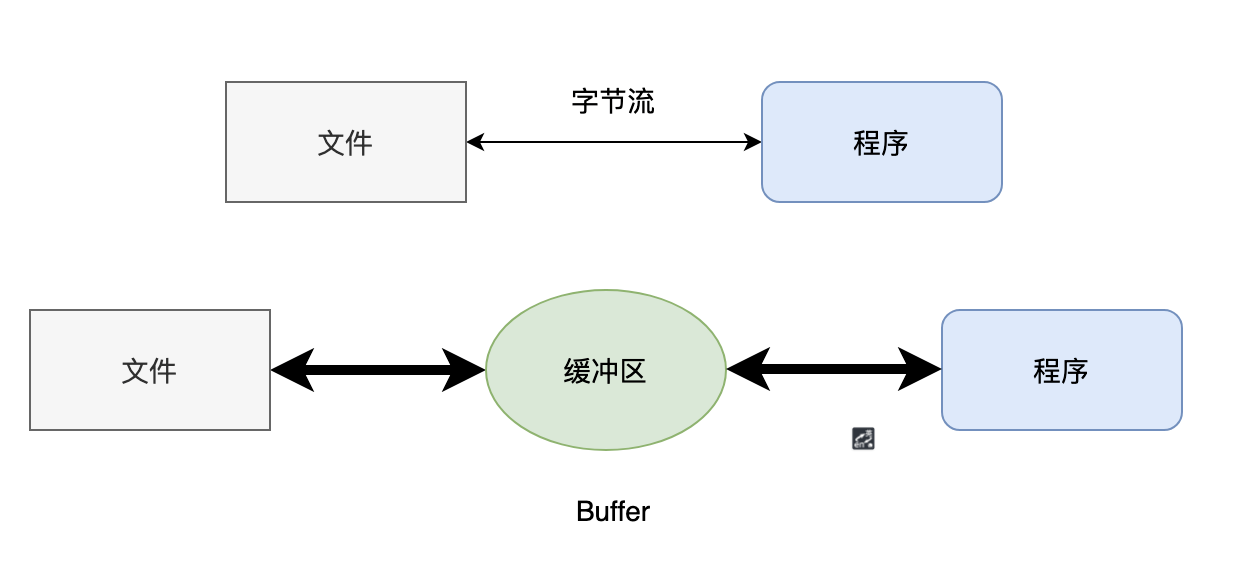
缓冲流会在内存中维护缓冲区,尽量批量读取或写入数据。
简单来说就是:
一次多读 / 写一点,减少底层 IO 次数,从而提高效率。
BufferedInputStream 读取文件:
public class BufferedInputStreamDemo {
    public static void main(String[] args) throws IOException {
        // 创建 BufferedInputStream
        BufferedInputStream bis =
                new BufferedInputStream(
                        new FileInputStream("data.txt")
                );

        // 创建字节数组
        byte[] buffer = new byte[1024];

        int bytesRead;

        while ((bytesRead = bis.read(buffer)) != -1) {
            System.out.println(
                    new String(buffer, 0, bytesRead)
            );
        }

        bis.close();
    }
}上述代码中,首先创建了一个 BufferedInputStream 对象,用于从文件中读取数据。
然后创建一个字节数组作为缓冲区,每次读取数据时将数据存储到缓冲区中,最后关闭 BufferedInputStream 释放资源。
BufferedOutputStream 写入文件:
public class BufferedOutputStreamDemo {
    public static void main(String[] args) throws IOException {
        // 创建 BufferedOutputStream
        BufferedOutputStream bos =
                new BufferedOutputStream(
                        new FileOutputStream("data.txt")
                );

        String data = "7788778877887788!";
        byte[] buffer = data.getBytes();

        bos.write(buffer);

        // 刷新缓冲区
        bos.flush();

        bos.close();
    }
}使用 BufferedOutputStream 写入数据时,数据会先进入缓冲区。
当缓冲区被填满,或者主动调用 flush() 方法时,再将数据写入底层输出流。
BufferedReader 读取文件:
public class BufferedReaderDemo {
    public static void main(String[] args) throws IOException {
        BufferedReader br =
                new BufferedReader(
                        new FileReader("data.txt")
                );

        String line;

        while ((line = br.readLine()) != null) {
            System.out.println(line);
        }

        br.close();
    }
}BufferedReader 可以通过 readLine() 方法按行读取文本数据。
BufferedWriter 写入文件:
public class BufferedWriterDemo {
    public static void main(String[] args) throws IOException {
        BufferedWriter bw =
                new BufferedWriter(
                        new FileWriter("data.txt")
                );

        String data = "你好,我是 kerwim!";

        bw.write(data);

        // 刷新缓冲区
        bw.flush();

        bw.close();
    }
}使用 BufferedWriter 写入数据时,数据同样会先进入缓冲区。
通过 flush() 可以主动将缓冲区中的数据写入底层输出流,close() 在关闭流的同时也会处理剩余的数据。
使用缓冲流可以减少频繁读写磁盘或网络的次数,从而提高程序的 IO 效率。
3.6 打印
Java 的打印流主要包括两个类:
PrintStream
PrintWriterJava 程序员最熟悉的打印流其实就是:
System.outSystem.out 本身就是一个 PrintStream 对象,可以用来输出各种数据。
System.out.println("小满胜万全!");PrintStream 最终输出的是字节数据,而 PrintWriter 继承自 Writer,最终输出的是字符数据。
两者在使用方式上非常相似,都提供了:
print()
println()例如:
StringWriter buffer = new StringWriter();

try (
        PrintWriter pw =
                new PrintWriter(buffer)
) {
    pw.println("kerwim");
}

System.out.println(buffer.toString());3.7 对象序列化 / 反序列化
序列化本质上是将 Java 对象转换为字节序列,这样就可以将其保存到文件中,或者通过网络进行传输。
例如:
public class ByteArrayOutputStreamDemo2 {

    public static void main(String[] args) {
        // 创建 ByteArrayOutputStream,用于存储数据
        ByteArrayOutputStream buffer =
                new ByteArrayOutputStream();

        // 创建 ObjectOutputStream
        try (
                ObjectOutputStream output =
                        new ObjectOutputStream(buffer)
        ) {
            output.writeUTF("kerwim");

        } catch (IOException e) {
            throw new RuntimeException(e);
        }

        // 转换成字节数组并输出
        System.out.println(
                Arrays.toString(
                        buffer.toByteArray()
                )
        );
    }
}与序列化对应的就是反序列化,也就是将字节数据重新恢复出来。
try (
        ObjectInputStream input =
                new ObjectInputStream(
                        new FileInputStream(
                                new File("Person.txt")
                        )
                )
) {
    String s = input.readUTF();
}上面的代码主要使用了 ByteArrayOutputStream 和 ObjectOutputStream,将字符串 "kerwim" 写入字节数组缓冲区中。
具体过程:
- 创建
ByteArrayOutputStream对象buffer,用于存储数据。 - 创建
ObjectOutputStream对象output,并与buffer关联。 - 使用
writeUTF()将字符串"kerwim"写入。 - try-with-resources 结束后自动关闭
ObjectOutputStream。 - 使用
toByteArray()将缓冲区中的数据转换为字节数组。 - 使用
Arrays.toString()输出字节数组。
对象序列化时,则可以使用:
writeObject()
readObject()后面可以在序列化部分再单独细讲。
3.8 转换
InputStreamReader 是字节流通向字符流的桥梁,它使用指定的字符集读取字节,并将字节解码为字符。
// 使用 FileInputStream 读取文件字节
InputStreamReader isr =
        new InputStreamReader(
                new FileInputStream("demo.txt")
        );

// 创建字符数组
char[] cha = new char[1024];

// 读取字符数据
int len = isr.read(cha);

// 输出数据
System.out.println(
        new String(cha, 0, len)
);

// 关闭流
isr.close();这段代码使用 FileInputStream 读取文件中的字节,再通过 InputStreamReader 将字节解码为字符,最后将字符读取到字符数组中。
OutputStreamWriter 则是字符流通向字节流的桥梁,它会按照指定字符集将字符编码为字节,再写入底层字节输出流。
// 创建 File 对象
File file = new File("test.txt");

// 创建 OutputStreamWriter
Writer out =
        new OutputStreamWriter(
                new FileOutputStream(file)
        );

// 写入字符数据
out.write("kerwim!!");

// 关闭流
out.close();使用转换流可以方便地在字节流和字符流之间进行转换。
在进行文本文件读写时,通常使用字符流进行操作;在进行网络传输或者与设备通信时,底层通常处理的是字节数据。
另外,在使用转换流时需要注意字符编码的问题。
如果不指定字符编码,就会使用默认字符编码,在不同环境下可能会出现乱码。因此,在使用转换流时,建议明确指定正确的字符编码,以避免乱码问题。